Features
Everything A11yMate does, module by module. 69 checks mapped to WCAG 2.2, plus the tools to fix what they find.
See it in WordPress
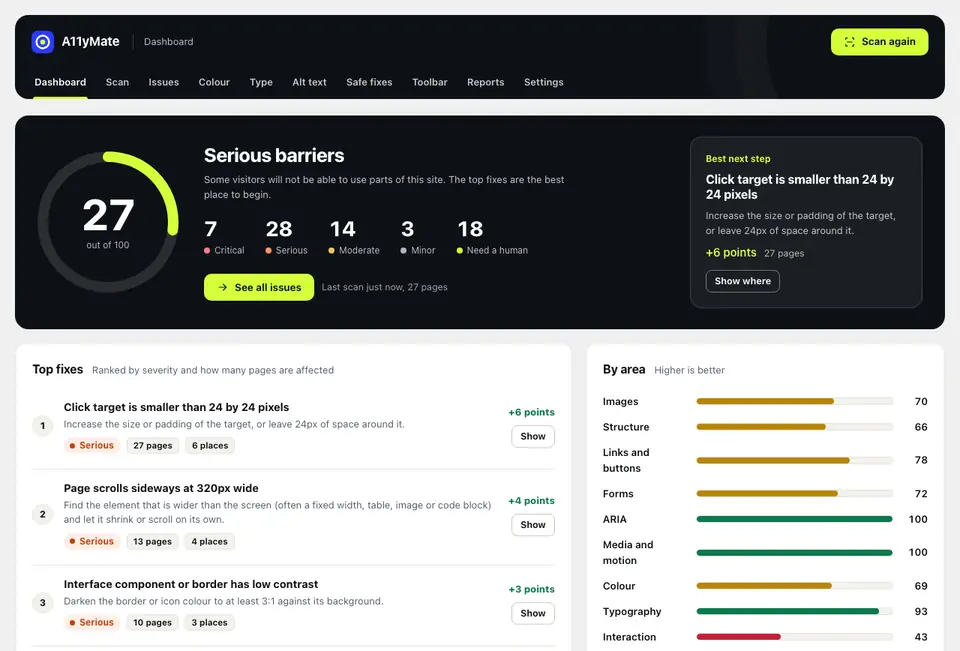
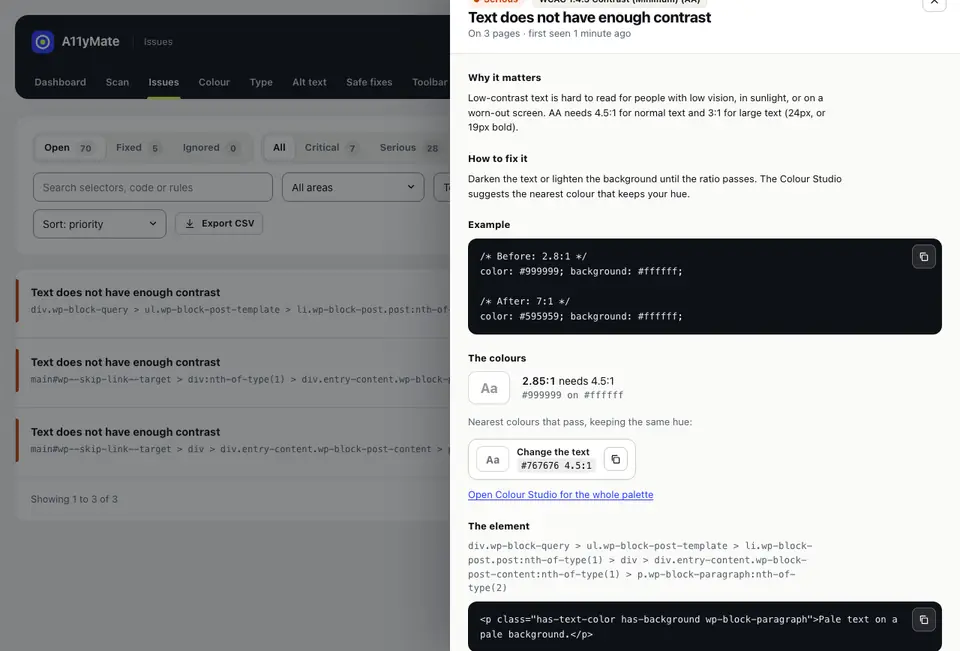
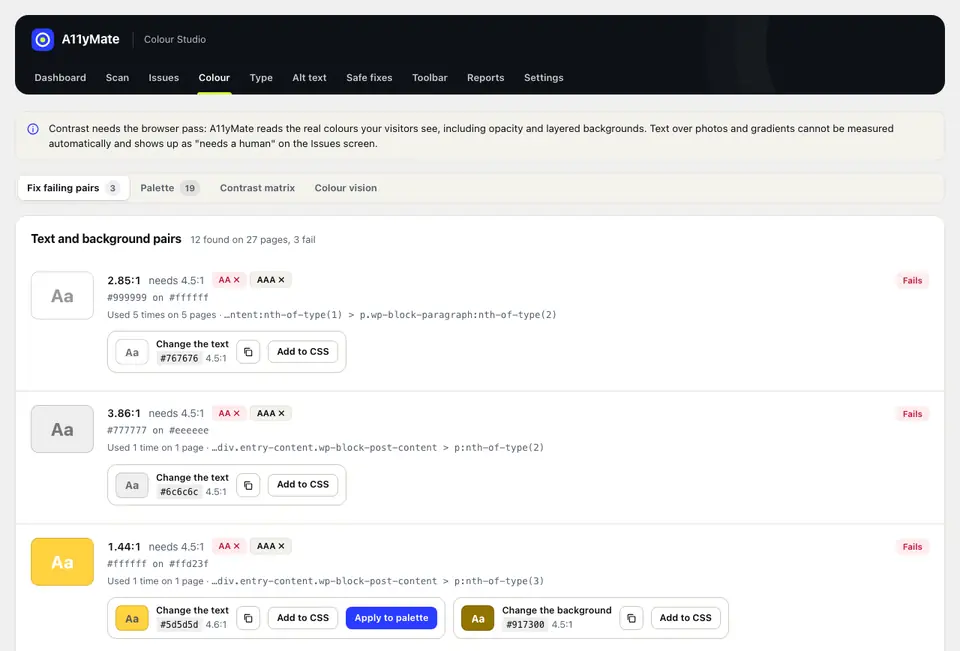
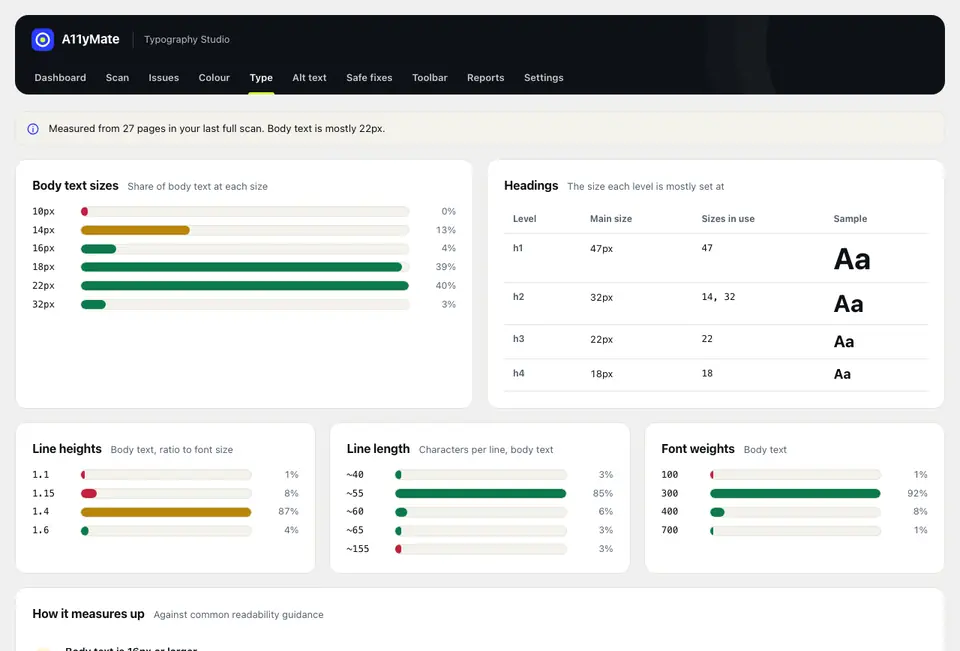
Screens from the plugin, running on a test site. The scores and issues are sample data.
Site Scan
Free and ProAudits the whole site, not just the homepage.
Site Scan finds your homepage, every published post and page, public custom post types, a sample of category and author archives, the search results page and your 404 page. You choose the scope. Free scans up to 25 pages, Pro has no page limit.
- Server pass: fetches each URL as an anonymous visitor and runs the structural rules. It runs in batches from the admin, from WP-Cron for scheduled scans and from WP-CLI.
- Rendered pass: loads each page in a hidden same-origin frame at 1280px and 375px wide and runs the rules that need real computed styles: contrast, font sizes, line height, target sizes, focus visibility, reflow, text spacing and motion.
- Scheduled and command-line scans cannot do the rendered pass. The results say so plainly.
- Live progress with pause, resume and cancel. If you close the tab the scan can pick up where it stopped.
- Template-level grouping: the same issue on the same element across many pages (header, footer, sidebar) is shown once, as "on 48 pages", not 48 times. This is what makes the results usable.
- Each issue is open, fixed (it disappeared on the rescan) or ignored, with a reason: false positive, will not fix or handled elsewhere.
- Configurable scope: post types, maximum pages and URL exclusions.
Rules
FreeEvery check explained like a helpful colleague would.
Each rule has a WCAG 2.2 success criterion with its level, a severity, a category, whether it is automated or needs a human review, why it matters, how to fix it, a code example and a link to the W3C Understanding document.
- Categories: images, structure, links and buttons, forms, ARIA, media and motion, colour, typography, interaction and content.
- Honest about limits. Some checks are advisory, and some say "needs review" because only a person can judge them.
- Up to date with WCAG 2.2. Success criterion 4.1.1 Parsing is gone, so duplicate IDs only matter where ARIA or a label points at them.
- Rules are registered through a filter, so developers can add their own.
Colour Studio
ProContrast problems fixed without losing your brand colours.
Colour Studio gathers your theme palette and every text and background pair found in the rendered pass, with how often each is used and where.
- Contrast matrix: every palette colour against every other, with AA, AA-large and AAA badges.
- Fix suggestions: for each failing pair, the nearest passing colour that keeps the hue (lightness is adjusted in OKLCH). Swatches with copy buttons, with both a darker-text and a lighter-background option.
- Block themes: an opt-in "apply to palette" writes to global styles, with undo. Classic themes get a CSS override to copy or apply.
- Colour-vision preview: your homepage through protanopia, deuteranopia, tritanopia and achromatopsia filters, side by side.
Typography Studio
ProSee the type scale you really have, then get a better one.
Typography Studio detects what is actually in use: a histogram of sizes for body text and for each heading level, the smallest sizes, line heights, line lengths and weights.
- Recommendations: body text of 16px or more, a line height of 1.5, 45 to 80 characters per line and a consistent heading scale.
- Generates a fluid clamp() type scale as CSS to copy, or opt in to apply it.
Editor Assistant
FreeFix it while you are writing, not six months later.
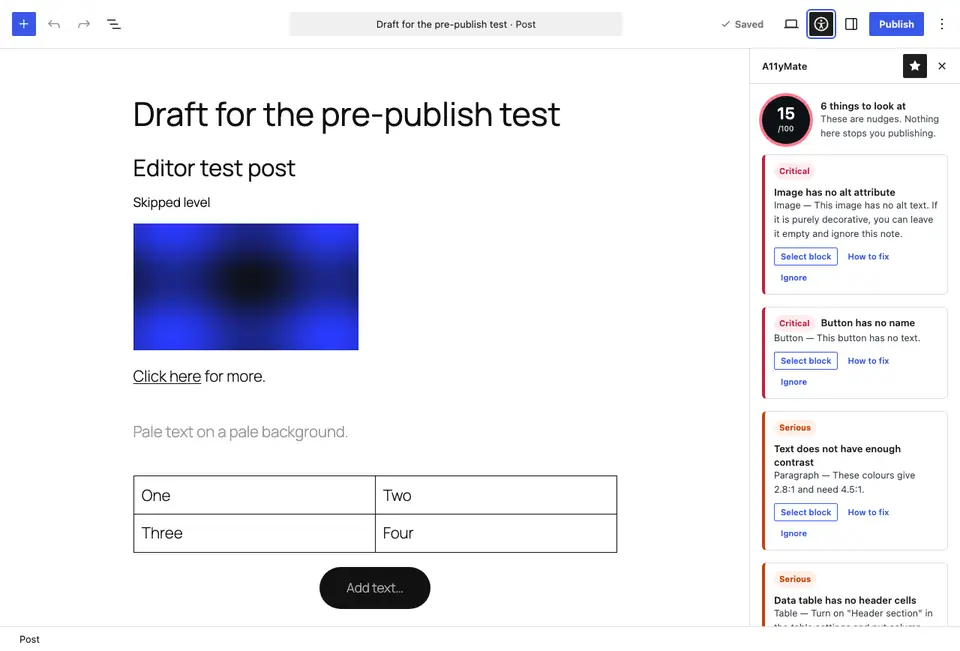
A sidebar panel and a pre-publish panel in the block editor check the post as it is written. It nudges. It never blocks publishing unless you turn on the option to require a check first.
- Images without alt text. Click the issue to select the block.
- Skipped heading levels, empty headings and empty buttons.
- Vague link text such as "click here".
- Contrast of each block's text and background colour settings, including palette colours.
- Tables without headers, very long paragraphs and all-caps text.
- A score for each post.
Alt Text Manager
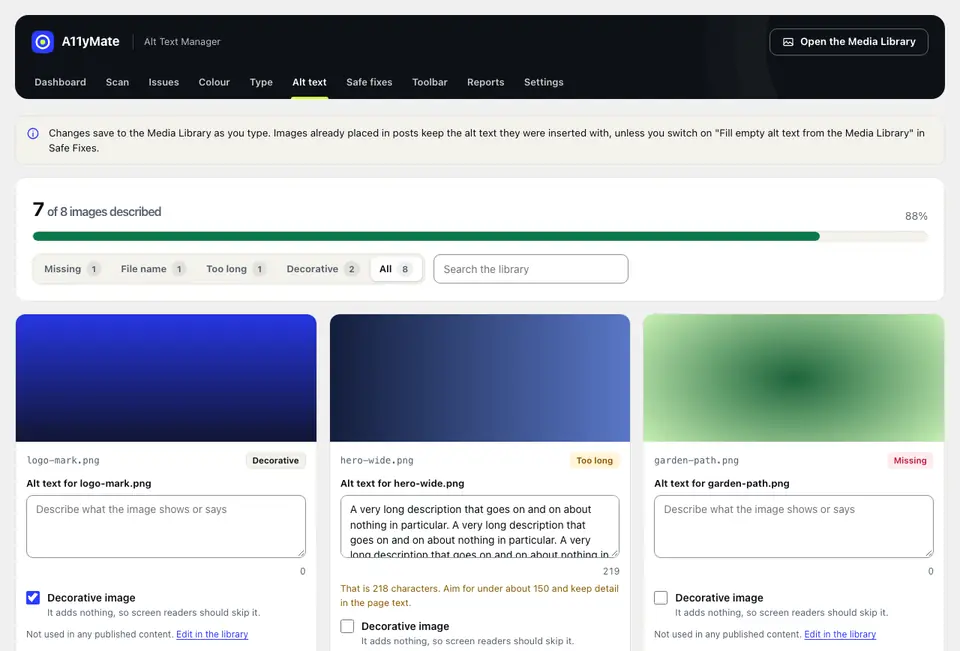
FreeEvery image in your media library, in one list.
See each image with missing or poor alt text, with a thumbnail, where it is used and a way to fix it on the spot.
- Filters: missing, file name, too long and decorative.
- Inline editing that saves as you go.
- Progress across the whole library, such as "312 of 340 images described".
Safe Fixes
FreeFixes you can switch on, with a plain explanation of each.
Safe Fixes change what your site outputs on the front end. Every fix is off by default and is a toggle that says what it changes. Nothing in the database is rewritten.
- Add a skip link.
- Restore pinch-zoom by stripping maximum-scale and user-scalable=no.
- Show a visible :focus-visible ring in a contrast-checked colour.
- Add "(opens in a new tab)" screen reader text to target="_blank" links.
- Add iframe titles from the oEmbed provider.
- Respect reduced motion: disable animations, transitions and smooth scroll under prefers-reduced-motion.
- Underline links in content.
- Add a missing lang attribute.
- Remove positive tabindex values.
Visitor Toolbar
ProAn optional preferences panel for visitors. Off by default.
A properly built dialog with keyboard support and focus return. Visitors can change text size, line and letter spacing, switch to a readable font, turn on high contrast, highlight links, pause animations, show a reading guide, enlarge the cursor or hide images. Their choices are remembered in their own browser.
- Position and colour are configurable.
- The admin screen says plainly that this is a convenience for visitors, not a compliance fix. It does not replace fixing your site.
Reports and statement
ProShow progress, and publish an accessibility statement you can stand behind.
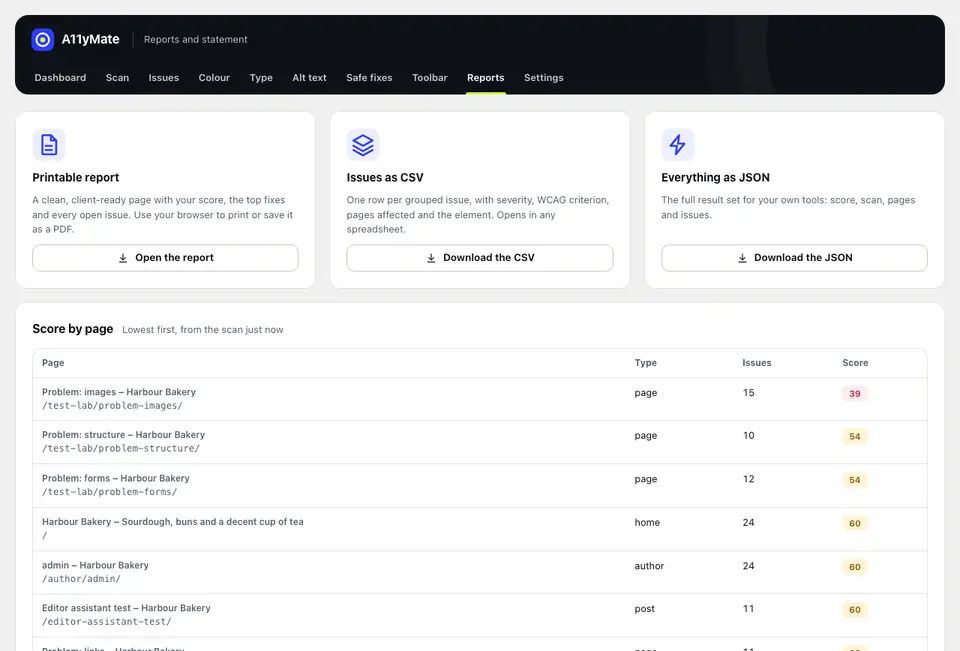
A score from 0 to 100, worked out from severity and how many pages each issue affects. You get it per page, per category and for the whole site, and a trend across scans.
- Exports: CSV of issues, JSON, and a client-ready printable HTML report. Agency adds white-label reports with your logo, name and colour.
- Accessibility statement generator: a short wizard (organisation, contact, conformance target, known issues pulled from the latest scan, review date) that creates or updates a page, modelled on the UK government model statement.
- Email digest after scheduled scans: the score change, new issues and fixed issues.
Settings and developers
All plansSensible defaults, and the hooks to go further.
Choose the scan scope and schedule, a notification email, which rule categories run and your WCAG target (A, AA or AAA). Decide which role can use A11yMate and whether to keep or delete data on uninstall.
- WP-CLI: wp a11ymate scan, wp a11ymate issues --format=table|csv|json and wp a11ymate score.
- REST API under /wp-json/a11ymate/v1, checked against capabilities.
- Hooks: a11ymate_rules, a11ymate_scan_urls and a11ymate_scan_complete.